
Using Splitini offline
Trips are exactly where you need to split expenses and exactly where the signal disappears. Splitini works without one: you can add expenses on a plane, in a basement bar, or on a hillside with no bars — and fix or delete one you got wrong — and it all sends itself once you’re back.
Nothing is lost if you close the app, and nothing is lost if your phone restarts — a queued change is written to your phone’s storage before anything is sent.
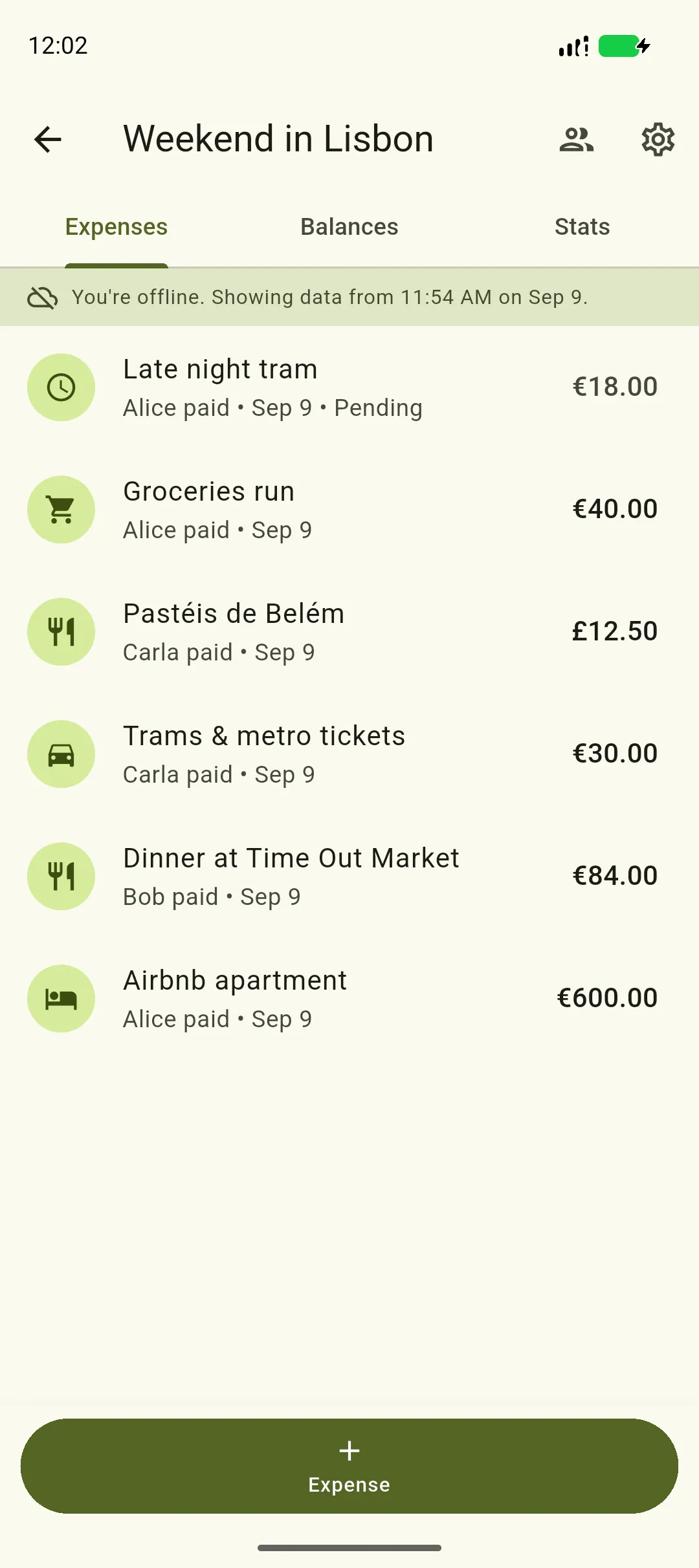
Queued expenses look like real ones
Section titled “Queued expenses look like real ones”An expense you add offline appears in the list in its proper place, by date, with everything else — same payer, same amount. The only difference is the word Pending under it, and a clock instead of a category icon.
Above the list, a banner says you’re offline and when the data you’re looking at was last fetched, so you always know how current the rest of the group is.
Editing works the same way
Section titled “Editing works the same way”Change an expense offline and the list shows your version straight away, marked Edited · waiting to sync. Everyone else still sees the old one until it reaches the server, so opening the expense itself shows you what they can see, with a note saying your changes are still on their way.
Deleting works the same way
Section titled “Deleting works the same way”Delete an expense while you’re offline and it doesn’t disappear straight away — it stays in the list with its title struck through and Deleting · waiting to sync underneath, because until the server has seen it, it’s still counted in everyone’s balance.
Tap that row for the options, including Undo delete. Undoing something that hasn’t been sent needs no connection at all: the change simply never happens.
Balances are estimated, and say so
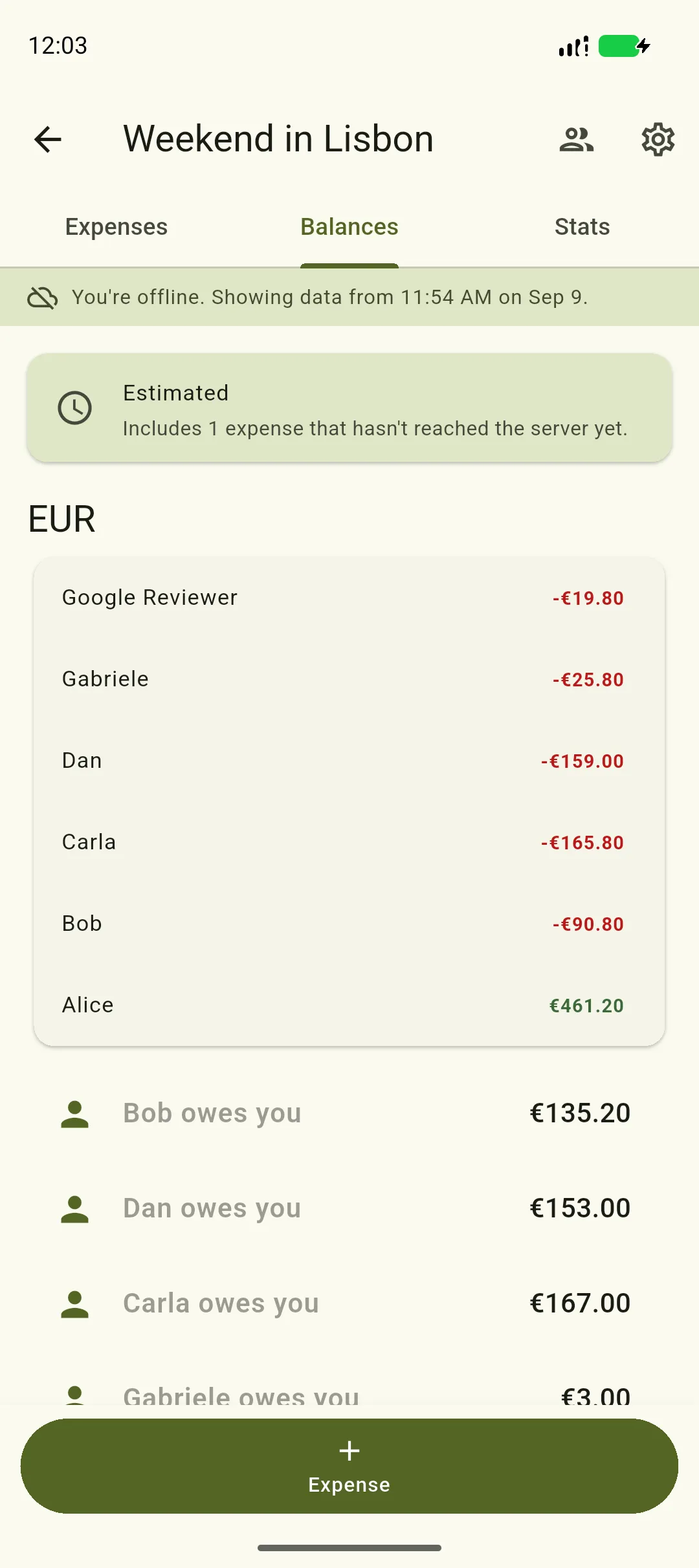
Section titled “Balances are estimated, and say so”Normally your balances are worked out on the server and your phone just displays them. It can’t do that for an expense the server hasn’t seen, so while anything is queued Splitini works the balances out on your phone instead, and tells you it has done so.
What you’ll see
Section titled “What you’ll see”- An Estimated card above the figures, saying how many changes aren’t on the server yet.
- Balances and debts that account for them — an expense you added is included, an expense you deleted is taken back out — so the numbers match what you’ve actually spent.
- A note under the debts repeating that this is an estimate.
Sending happens on its own
Section titled “Sending happens on its own”You don’t have to open the app, or press anything. When your connection comes back, Splitini sends what’s queued — including while the app is in the background.
When queued changes go through and you weren’t watching, you get a notification: “1 expense you added offline is now in Berlin trip.” — or, if a deletion was in there too, “2 changes you made offline are now saved in Berlin trip.” It only appears for changes you’d already walked away from, so adding an expense on a good connection never produces one.
When someone else changes something
Section titled “When someone else changes something”The flip side of the same idea: while you have a group open, you don’t have to pull down to see what your group-mates are doing. Someone adds an expense on their phone and it appears on yours a second or two later, with the balances already updated.
This works while the app is open and in front of you. Close the app or switch away and it stops — deliberately, because a permanently-open connection is one of the fastest ways to drain a battery. Reopening the group refreshes it, so you never miss anything by having been away.
If something can’t be sent
Section titled “If something can’t be sent”Occasionally the server refuses a change — someone left the group before it arrived, or the split no longer adds up. Those stay at the top of the expense list rather than sitting where their date would put them, so you can find them.
Tap one for the options. A refused expense is marked Didn’t sync: nothing has been charged to anybody and the balances never include it. A refused deletion is marked Couldn’t delete, and means the opposite — the expense is still there and still counted, which is exactly why you’re being told.
Trying again is always safe where it is offered: sending the same change twice can never produce a duplicate expense, or delete something twice.
One case has no Try again, on purpose — an edit that lost a race. Retrying would send the same out-of-date version and fail in exactly the same way, so the options are to discard your changes or open the expense and see what the other person did.
What’s kept on your phone
Section titled “What’s kept on your phone”Groups, members, expenses, settlements and balances are kept so you can read them offline. Payment details, profiles and friends deliberately aren’t — those are only ever fetched fresh, because people can change who’s allowed to see them, and a copy on your phone wouldn’t know.
There’s more on this in the privacy policy.