
Saying an expense
Splitini can listen to you. Say what you spent — the way you’d say it to the person sitting next to you — and the description, the amount, the currency, the date, the category, who paid and how it’s split all arrive already filled in.
You don’t have to speak carefully. This is a normal thing to say, and it works:
“Last night Bob paid for dinner at the Time Out Market — ninety euros, no, a hundred and ten with the wine — split between everyone except Carla, she’d already eaten.”
That one sentence sets the payer to Bob, the total to 110 (the correction, not the ninety), the date to yesterday, and the split to everyone but Carla.
Saying one
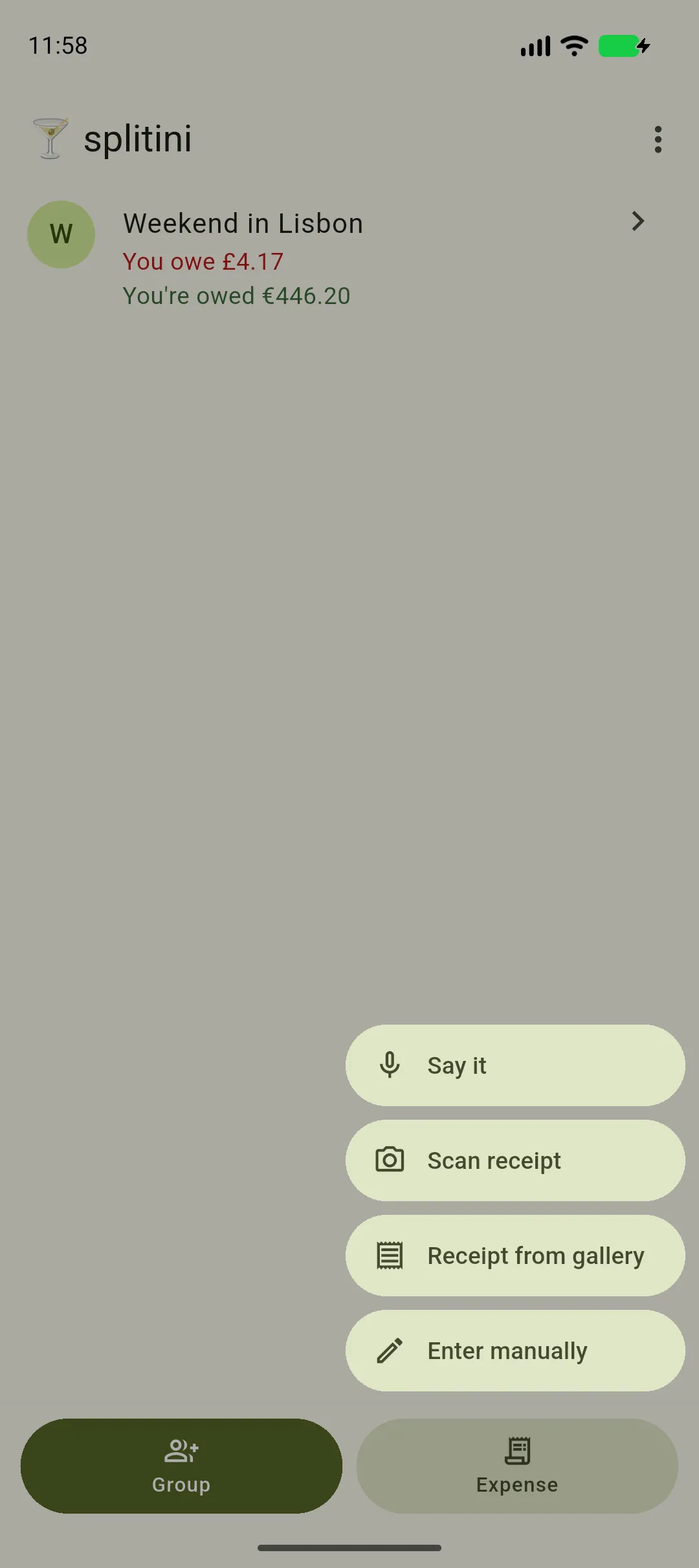
Section titled “Saying one”Say it lives under Expense at the bottom of the screen — on the groups list, and inside a group. Tap it and start talking: it is already listening. There’s nothing to press first.
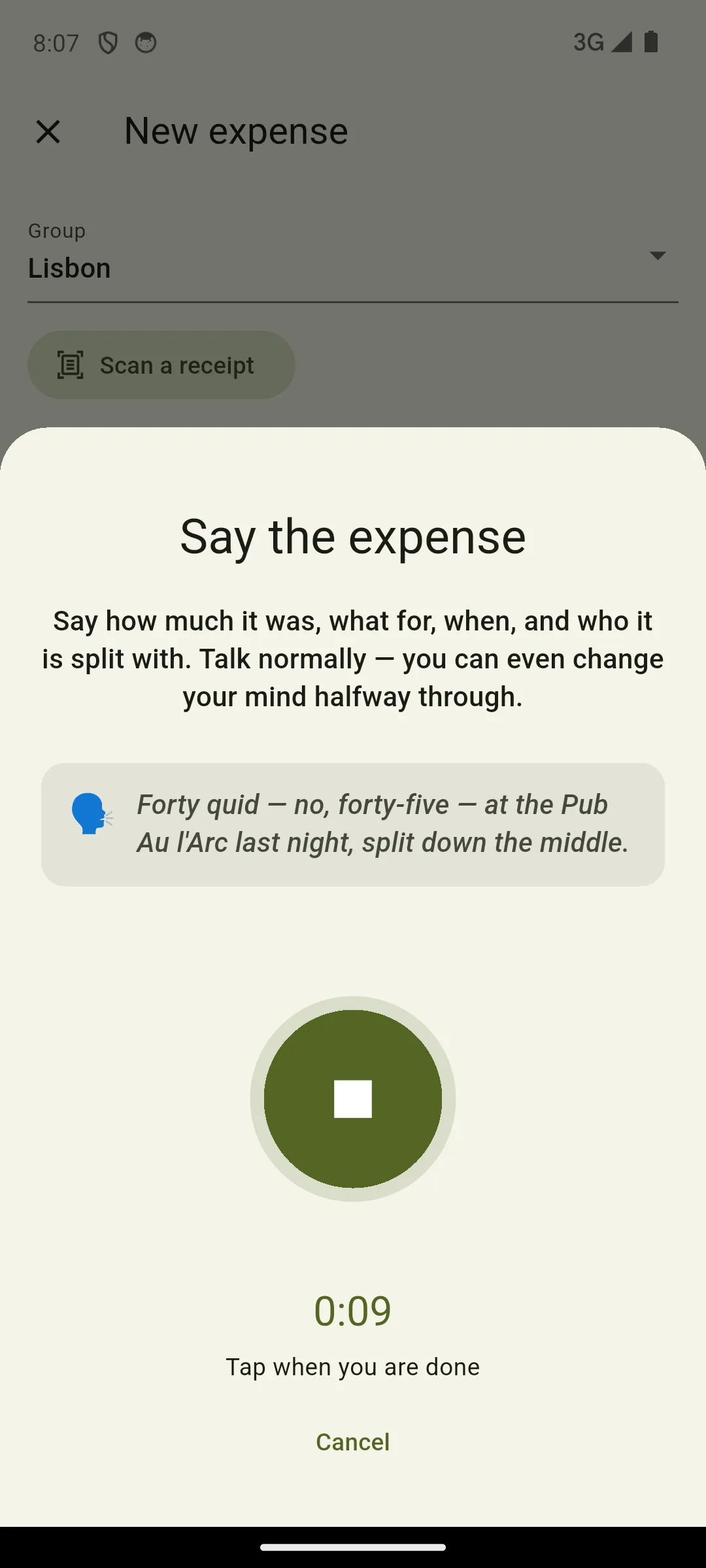
There’s an example on screen if you want a model to copy, and the button you press to stop also shows it can hear you: the ring around it moves with your voice. Underneath, how long you’ve been talking.
Tap the button once when you’re done. Cancel throws the recording away and sends nothing.
You get thirty seconds, which is far more than anyone needs — and it stops on its own at thirty, so a phone left face-down in a pocket isn’t still listening.
The first time, Splitini explains who listens — the recording goes to Google’s Gemini and to nobody else — and then your phone asks separately for the microphone. Say no to either and the form still works exactly as it did.
What you can say
Section titled “What you can say”Anything you’d say to a friend. Some things worth knowing you can do:
- Change your mind. “Forty — no, forty-five” is forty-five. Splitini takes the last number you said, not the first.
- Name who paid. “Bob got this one” sets Bob as the payer, not you.
- Leave someone out. “Split between everyone except Carla” does exactly that.
- Weight it. “Marco counts double, he’s got the kids” splits it by shares.
- Say when. “Yesterday”, “last night”, “at eight this morning” all land in the date and the time. Naming a part of the day gives an approximate time — “last night” becomes 9 PM — and giving a real one is taken exactly. The time is a field on the form like any other, so nudge it if it matters.
- Say it in your language. Speak whatever language you like — it doesn’t have to be the one the app is set to — and what you said is written down in the language you said it.
What it fills in, and what it leaves alone
Section titled “What it fills in, and what it leaves alone”Only empty fields. If you’ve already typed a description and then say the amount, your words stay exactly as you wrote them, and Splitini says underneath that it left them alone. The currency is treated as part of the amount — if you already typed a total, neither is touched.
The split is all or nothing. If Splitini isn’t certain about any part of it — a name it doesn’t recognise, amounts that don’t add up to the total — it leaves the split exactly as it was and tells you, rather than applying the part it understood. A split that’s almost right is the kind of mistake nobody notices, and it’s someone else’s money.
So if you name a person who isn’t in the group, you’ll see which name it didn’t recognise, and the split will be untouched for you to set yourself.
What you said goes into the notes
Section titled “What you said goes into the notes”The words you spoke are written into the expense’s notes, so you — and everyone else in the group — can see where the numbers came from. It’s the receipt for the recording.
The recording itself is never kept. Not on your phone, not by us. It exists for as long as it takes to send, and then it’s gone.
When it doesn’t work
Section titled “When it doesn’t work”| What you see | What happened |
|---|---|
| “Check the details before saving.” | It heard you. Give it a glance. |
| “We didn’t hear anything.” | The recording was silent — nothing was sent. Try again closer to the microphone. |
| “We couldn’t make that out.” | It listened and got nothing usable. Somewhere quieter, or type it in. |
| “We didn’t recognise Beatrice…” | A name that isn’t in this group. The split is left as it was. |
| “We couldn’t tell who paid…” | Someone else was named as paying, but not someone in this group. It’s still down to you. |
| “…which Splitini can’t store yet” | A currency Splitini doesn’t handle. Enter the amount and currency yourself. |
| “Saying an expense needs a connection.” | Everything else on the form works offline — this one thing doesn’t. |
If it fails after you’ve spoken — a dropped connection, a slow moment — there’s a Try again right under the message, and it reuses what you already said. You don’t have to say it twice.
What it costs you
Section titled “What it costs you”Nothing. Saying an expense is included, and there’s no charge per go. Splitini caps what it spends overall, so very occasionally it will say it’s reached its limit for the month — the form still works, and so does typing.